An announcement can create a false sense that the setup process is part of a countdown. Usually it is not. Account creation, identity verification, security configuration and funding each deserve attention before you decide whether to buy anything. A missed headline is cheaper than a rushed security mistake.
Disclosure: this page contains a referral link
This guide carries one Binance referral link, placed under Create the account below. If you register through it, Meansline may receive a share of the fees Binance charges you on later trades. We do not promise you a bonus, a rebate or a fee discount in exchange — only the terms displayed inside your own account apply. The link is marked sponsored and nofollow, and you can reach Binance directly instead without changing anything on this page. Our editorial policy explains why the conclusions here are not conditioned on it.
Before registration: check availability
Binance products, onboarding requirements and legal entities differ by location. Confirm that the service and the product you intend to use are available where you reside. The registration flow may route you to a regional entity with its own terms.
Prepare an email account you control, a unique password, and the identity documents requested in your jurisdiction. Do not register through a link sent by an unknown social account. Check the domain before entering personal information.
This guide describes the general sequence visible in Binance educational materials as reviewed on 23 August 2026. The live interface is the authority if labels or order change.
Create the account
Use an email address or phone number you expect to keep. Choose a password that is unique to the exchange and store it in a trusted password manager. Complete the email or phone verification sent during signup.
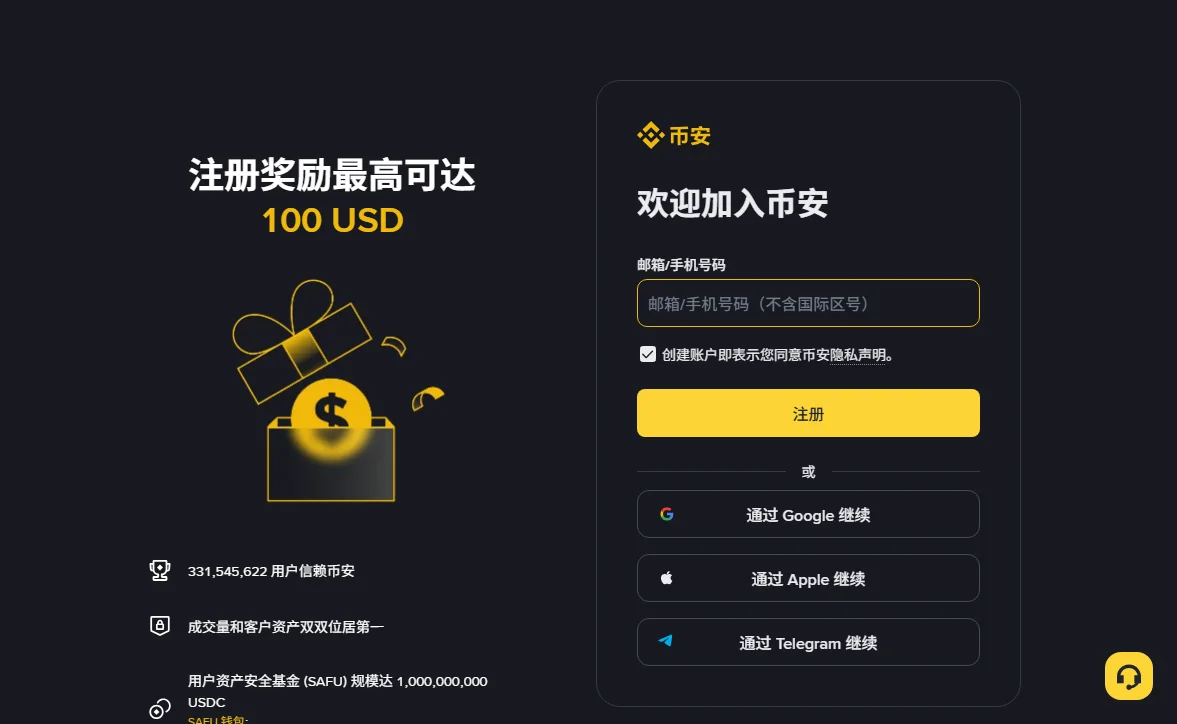
Referral link (sponsored)
Registration page: accounts.binance.com/register — referral code BN0112. If you register through it and later trade, Meansline may receive a share of the fees Binance charges you; see the disclosure above. Read the registration page before continuing, and do not assume a bonus, fee rate or product is available unless the terms displayed for your account explicitly say so. If you prefer no referral attribution, type the Binance address yourself.
Complete identity verification
Identity verification commonly asks for personal information, a government-issued identity document and a facial check. Exact requirements depend on region and account type. Use clear, current documents and make sure the submitted details match.
Complete verification from the authenticated account interface. Do not send identity scans through direct messages, unofficial chat groups or email addresses you cannot verify. If the process fails, use support reached from the platform itself.
Verification can take time. That delay is not a reason to create duplicate accounts or accept help from someone offering to “unlock” an account. Treat anyone asking for your password, authentication code or remote access as unsafe.
Secure the account before funding it
Security setup belongs before the first deposit, not after the balance becomes worth protecting.
- Enable a strong second factor or passkey. An authenticator app, hardware key or supported passkey avoids relying on the password alone. Store recovery information securely and separately.
- Protect the connected email. Give the email account its own unique password and second factor.
- Set an anti-phishing code if available. This can help distinguish official platform emails, though it does not replace checking the sender and destination.
- Review authorized devices. Remove any device or session you do not recognize.
- Consider a withdrawal-address allowlist. Understand its activation delay and recovery process before relying on it.
Security settings can trigger temporary withdrawal restrictions after changes. Read the confirmation message before planning a time-sensitive transfer.
Choose a funding route deliberately
Available deposit methods can include bank transfer, card purchase, peer-to-peer routes or direct crypto deposits, depending on jurisdiction. Each has different fees, processing times, counterparties and reversal characteristics.
For a crypto deposit
Select the asset and network in the deposit interface. The network at the sending wallet must match the network shown by the receiving exchange. Copy the address carefully and include any required memo or tag. A small test transfer can reduce the size of an addressing mistake, though it adds another network fee.
For a fiat route
Check supported currencies, account-name requirements, fees and processing time in the live interface. Do not send funds to payment details supplied outside the authenticated order or deposit flow.
A deposit that arrives during wallet maintenance may wait for confirmations or service restoration before it is credited. Check the asset's current deposit status before sending.
Plan the first order before placing it
A market order prioritizes execution and accepts the available order book; the final average price can differ from the last quoted price, especially in a thin or fast-moving market. A limit order specifies the worst price you accept but may remain unfilled. Learn which behavior you are choosing before clicking buy or sell.
Check the trading pair. Buying ABC/USDT spends USDT; buying ABC/USDC spends USDC. Review order size, estimated fee and order type on the confirmation screen. Start with an amount small enough that an interface mistake is a lesson rather than a crisis.
Decide separately where the asset will be held. Leaving it on an exchange accepts platform custody. Moving it to self-custody gives you responsibility for keys, backups and compatible networks. Neither choice should be made because a headline created urgency.
The mistakes specific to headline-driven users
Chasing the first visible price
A listing notice can concentrate attention before the market is liquid. A chart moving quickly is not evidence that the next move will continue in the same direction. Access has changed; fair value has not been revealed by the announcement.
Turning one story into an all-in decision
An announcement usually changes one fact: venue access, product support, a deadline or a network operation. It does not replace a view of liquidity, token supply, project execution, custody risk or personal loss tolerance.
Panicking at a scheduled wallet pause
If a network-upgrade notice says deposits and withdrawals will pause while trading remains open, that is an operational separation. Read the scope and timing before treating it as a platform-wide problem.
Letting the account process decide the trade
Time spent registering does not create an obligation to deposit. Money deposited does not create an obligation to trade. An order screen opened does not create an obligation to submit. Preserve the right to stop at every stage.
Setup is not momentum. Completing the account does not validate the headline that brought you there.
To understand the notice before acting on it, return to the Meansline announcement field guide.
2 October 2026 update: added the public registration screenshot and clarified that referral compensation may come from subsequent trading fees. The general instructions above retain their stated source-review date.
Sources and scope
General account and security steps were reviewed on 23 August 2026 against Binance educational materials. Interface labels and regional availability can change.